This is very good idea to compresses CSS file before uploading it on web server, It compress the file size and improve performance of web site. But some time we need to edit the same compresses file it is very big headache, There is a small online tool to compress and decompress CSS.
22 July 2009

10 July 2009
 Friday, July 10, 2009
 saAction
Microsoft have launch new search web site, Bing.com, When we open this web site, there will be a cool background every day.

Find all archives of those cool background from here.
If you don’t want to load that image use this URL one time http://www.bing.com/?rb=0. Here rb=0 means No Background Image, and type rb=1 to load it.
09 July 2009
Thursday, July 09, 2009
saAction
Let create cool JavaScript thumbnail zoom effect.
The concept is that there will be thumbnail on page user can see it and original image will be hidden at the same time and when user rollover on that thumbnail hidden main image will smoothly resize on the same place.
Settings :
Thumbnail Image
thats all when you will mouse over on thumbnail it will show main mage on same plase with smooth scrool effect.
 Isn't it cool download demo.
The concept is that there will be thumbnail on page user can see it and original image will be hidden at the same time and when user rollover on that thumbnail hidden main image will smoothly resize on the same place.
<script src="thumbscreen.js" type="text/javascript"></script>

<div>

<img src="saAction Real.jpg" alt="saAction" id="screen1"
onmouseout="reducethumb(1); return false;" style="position: absolute;
display: none;" width="240" border="0" height="269">

<img src="saAction Thumb.jpg" alt="saAction" id="thumb1"
onmouseover="expandthumb(1, 500, 300);">

</div>
Settings :
Thumbnail Image
- id must be "thimbN", N means number example : thumb1, thumb2 etc.
- add "onmouseover" event and cell "expandthumb" function
- "expandthumb" have three arguments (thumbnail ID last number, main image width, main image height)
- id must be "screenN", N means number example : screen1, screen2 etc.
- Style="display:none;"
- add "onmouseout" event and cell "reducethumb" function
- "reducethumb" function take one argument (main image ID last number)
thats all when you will mouse over on thumbnail it will show main mage on same plase with smooth scrool effect.
Isn't it cool download demo.
08 July 2009
Wednesday, July 08, 2009
saAction
I have faced this problem many times posting an article on blog spot. I was not able to provide good HTML, C# or any other code with color formatting, The problem is at the HTML code was rendering as HTML and breaking the post content, It is not able to get different between our articles code and its own code.
So tried to find its solution over the net, and get many good result.

2) C# Code FormatThis is very cool tool, It provides us to seelct language like C#, VB.Net, HTML, T-SQL and MSH. This is also option to add live number in code.
 Just click on “Format My Code” button and you will get encoded HTML code with preview. See the result example below:
 this is cool result, we can aslo change code style as we want, and its give CSS, it is good to apply CSS in <header> tag and the reason is that we don’t have to apply CSS file in each post.
3) CopySourceAsHtml

There is a one cool feature for Line Number, we enter starting line number, It is user fult when we are giving information in detailed description. Syntax highlighting, CSAH uses Visual Studio's syntax highlighting and font and color settings automatically. If Visual Studio can highlight it, CSAH can copy it, and your source should look the same in your browser as it does in your editor.


So tried to find its solution over the net, and get many good result.
1) SimpleCode
This very simple code online tool to converter HTML in compress mode. simple and quick, Enter HTML markup, click on “Process” button and get encoded markup, you will also see preview at the buttom of the page2) C# Code FormatThis is very cool tool, It provides us to seelct language like C#, VB.Net, HTML, T-SQL and MSH. This is also option to add live number in code.
Just click on “Format My Code” button and you will get encoded HTML code with preview. See the result example below:this is cool result, we can aslo change code style as we want, and its give CSS, it is good to apply CSS in <header> tag and the reason is that we don’t have to apply CSS file in each post.3) CopySourceAsHtml
CSAH is one kind of add-in for Microsoft Visual Studio only It is able to work with Visual Studio 2003, 2005 and 2008.
After installing this add-in there will be a new menu in “Edit”, named “Copy as HTML…”. When you click on it will show a dialogbox for settings.

There is a one cool feature for Line Number, we enter starting line number, It is user fult when we are giving information in detailed description. Syntax highlighting, CSAH uses Visual Studio's syntax highlighting and font and color settings automatically. If Visual Studio can highlight it, CSAH can copy it, and your source should look the same in your browser as it does in your editor.
4) Encode / Decode HTML Entities
Here we have good feature that we can aslo decode give HTML.
But there is not any advance fuatures as line number or color formating.
5) BlogJet
If you want POST in your blog by any desktop application that can add post directly in your blog, BlogJet is a good software. It is a popular Windows blog client for your WordPress, TypePad, Blogger, Drupal, etc. blogs. Get convenience and speed of a native application, and the ability to write posts offline.

We can also save post in our cumputer by “bjd” file format, This application will automatically decode HTML content.
So, here are many featurs abailabel to post HTML, C#, VB.Net.
Go ahad and start posting with user friendly look.
07 July 2009
Tuesday, July 07, 2009
saAction
Microsoft .Net Framework 3.5 provides Chart Control for Windows and Web applications.
let learn quick start about Chart control with Asp.net web site.
You have to download MSChart for Microsoft .NET Framework 3.5, It will install new assemblies that contain the ASP.NET and Windows Forms Chart Controls.
After its installation you have to add that control in Visual Studio's ToolBox, it will not comes automatically.
there are two ways to do it, Download Microsoft Chart Controls Add-on for Microsoft Visual Studio 2008. It is provide Visual Studio toolbox integration and IntelliSense for the Asp.NET and Windows Forms Chart controls and will start to show in toolbox, else use second way just drag and drop it's DLL file or chose item from toolbox from "[SystemDrive]\Program Files\Microsoft Chart Controls\Assemblies" all chart control's dll files are here,
Use "System.Web.DataVisualization.dll" for Web applications and "System.Windows.Forms.DataVisualization.dll" for Windows Form application
Now we are ready to use Microsoft Chart Control.
Now create a new web page and drag and drop chart control on page.
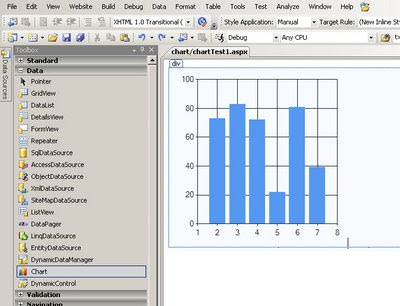
See the chart control's HTML:
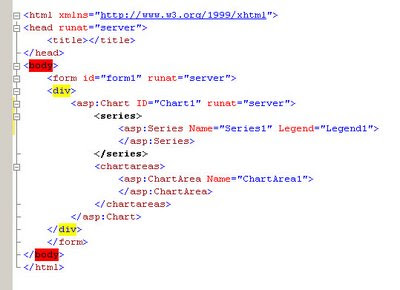
Now you can bind directly form database but here lets create a class for with to fields Name and Salary.
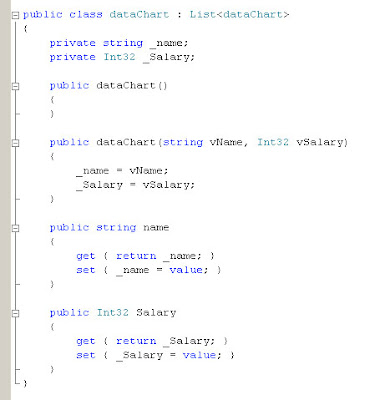
So we have two fields here Name and Salary, lets enter some records in page load event.
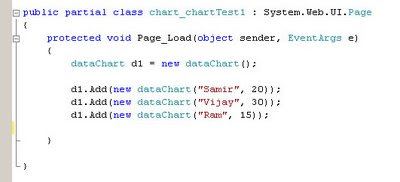
Three records are entered. Now lets bind chart control.
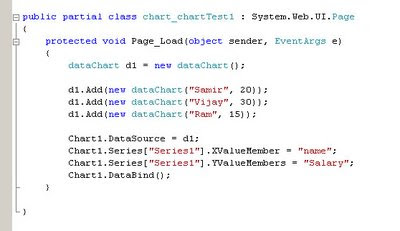
"Series" property is use to create X and Y axis data.
lets see the result :
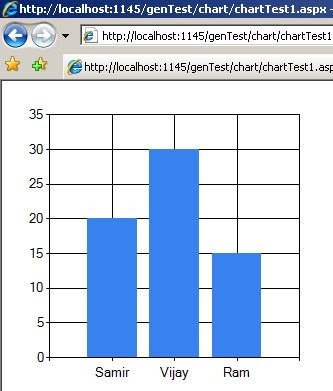
This is column chart as default chart type, now lets change ChartType="Pie" and see the results:
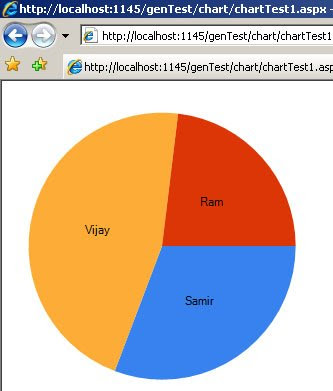
There are many chart types are available and we can also create 3d chart. you can also save chart result as image using "SaveImage()" method. and also many other features. You can also bind with database using DataTable and also can write down static columns (Series) using HTML.
This is very useful control whenever we required to create chart.
Happy codding.
let learn quick start about Chart control with Asp.net web site.
You have to download MSChart for Microsoft .NET Framework 3.5, It will install new assemblies that contain the ASP.NET and Windows Forms Chart Controls.
After its installation you have to add that control in Visual Studio's ToolBox, it will not comes automatically.
there are two ways to do it, Download Microsoft Chart Controls Add-on for Microsoft Visual Studio 2008. It is provide Visual Studio toolbox integration and IntelliSense for the Asp.NET and Windows Forms Chart controls and will start to show in toolbox, else use second way just drag and drop it's DLL file or chose item from toolbox from "[SystemDrive]\Program Files\Microsoft Chart Controls\Assemblies" all chart control's dll files are here,
Use "System.Web.DataVisualization.dll" for Web applications and "System.Windows.Forms.DataVisualization.dll" for Windows Form application
Now we are ready to use Microsoft Chart Control.
Now create a new web page and drag and drop chart control on page.
See the chart control's HTML:
Now you can bind directly form database but here lets create a class for with to fields Name and Salary.
So we have two fields here Name and Salary, lets enter some records in page load event.
Three records are entered. Now lets bind chart control.
"Series" property is use to create X and Y axis data.
- protected void Page_Load(object sender, EventArgs e)
- {
- dataChart d1 = new dataChart();
- d1.Add(new dataChart("Samir", 20));
- d1.Add(new dataChart("Vijay", 30));
- d1.Add(new dataChart("Ram", 15));
- Chart1.DataSource = d1;
- Chart1.Series["Series1"].XValueMember = "name";
- Chart1.Series["Series1"].YValueMembers = "Salary";
- Chart1.DataBind();
- }
lets see the result :
This is column chart as default chart type, now lets change ChartType="Pie" and see the results:
There are many chart types are available and we can also create 3d chart. you can also save chart result as image using "SaveImage()" method. and also many other features. You can also bind with database using DataTable and also can write down static columns (Series) using HTML.
This is very useful control whenever we required to create chart.
Happy codding.
06 July 2009
Monday, July 06, 2009
saAction
Many mobile user uses Flash animated wallpaper or screen sever, and they really like some kind of motion on mobile phone screen. And if you know flash and want to create some existing job with it. This quick tutorial will be help full to you.
lets create flash file which can run in your mobile?
This is very easy, lets create a flash file to apply it as wallpaper or screen sever.
I am using Flash cs2 to create this application.
Open Flash and select "Flash File (Mobile)" option.
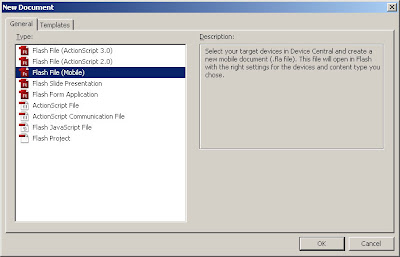
You will get new dialog box for mobile application.
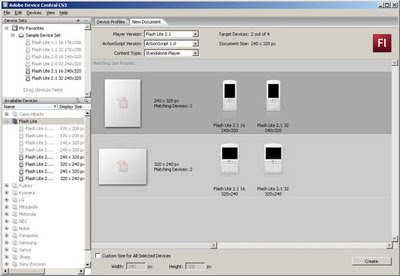
Select appropriate mobile phone device as per your requirement, I have Nokia 6300 and there for I am select using Flash Lite 2.0 16 240 X 320 from Device Set list.
click on "Create" button after selection, you will get blank flash with mobile screen layout.
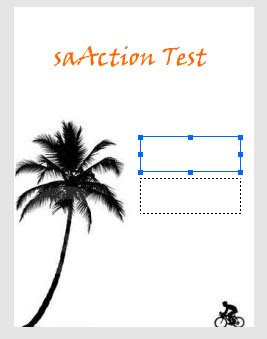
Now put some images and text etc as you want:
and also create two text box to show bettye level and signal.
Chagnge those two textboxes property as dynamic and server variable.
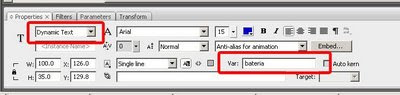
Textbox 1 : variable name "nBattery"
Textbox 2 : variable name "nSignal"
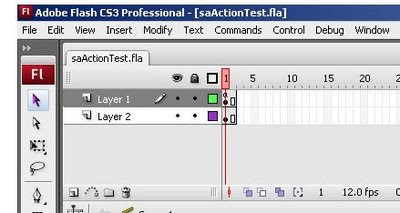
Now create two frame, this is because frame will play it self and every time we can get new amount for battery and signal :
Now add below action script
Add this script in first frame.
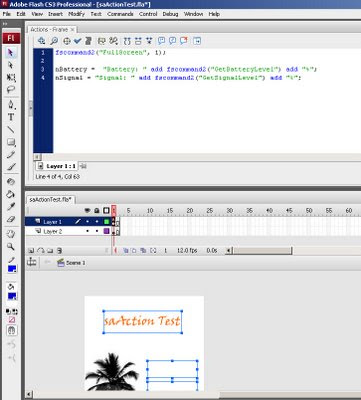
Here it is that code.
that's all.
see the preview in emulator by pressing "Ctrl + Enter"
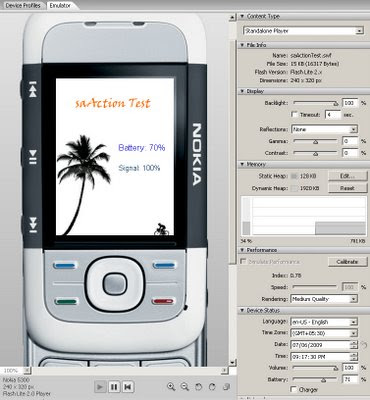
it will compile the code and will create a SWF file.
Now transfer that "swf" file in your mobile phone. and you can user it as wallpaper or screen sever.
Remember that your mobile phone need Flash support.
Create your own name's wallpaper, screen sever and apply it in mobile phone, and send to your friends.
have some fun.
lets create flash file which can run in your mobile?
This is very easy, lets create a flash file to apply it as wallpaper or screen sever.
I am using Flash cs2 to create this application.
Open Flash and select "Flash File (Mobile)" option.
You will get new dialog box for mobile application.
Select appropriate mobile phone device as per your requirement, I have Nokia 6300 and there for I am select using Flash Lite 2.0 16 240 X 320 from Device Set list.
click on "Create" button after selection, you will get blank flash with mobile screen layout.
Now put some images and text etc as you want:
and also create two text box to show bettye level and signal.
Chagnge those two textboxes property as dynamic and server variable.
Textbox 1 : variable name "nBattery"
Textbox 2 : variable name "nSignal"
Now create two frame, this is because frame will play it self and every time we can get new amount for battery and signal :
Now add below action script
Add this script in first frame.
Here it is that code.
- fscommand2("FullScreen", 1);
- nBattery = "Battery: " add fscommand2("GetBatteryLevel") add "%";
- nSignal = "Signal: " add fscommand2("GetSignalLevel") add "%";
that's all.
see the preview in emulator by pressing "Ctrl + Enter"
it will compile the code and will create a SWF file.
Now transfer that "swf" file in your mobile phone. and you can user it as wallpaper or screen sever.
Remember that your mobile phone need Flash support.
Create your own name's wallpaper, screen sever and apply it in mobile phone, and send to your friends.
have some fun.
05 July 2009
Sunday, July 05, 2009
saAction
Have some fun, Whether you wear Specs or not, Its Mandatory U Complete each Test in 4-5 Seconds,
This is a simple neurological test.
Sit comfortably and be calm !
1- Find the C below. Do not use any cursor help.
OOOOOOOOOOOOOOOOOOO
OOOOOOOOOOOOOOOO OOOOOOOOOOOOOOOO
OOOOOOOOOOOOOOOOOOO
OOOOOOOOOOOOOOOO OOOOOOOOOOOOOOOO
OOOOOOOOOOOOOOOOOOO
OOOOOOOOOOOOOOOO OOOOOOOOOOOOOOOO
OOOOOOOOOOOOOOOOOOO
OOOOOOOOOOOOOOOO OOOOOOOOOOOOOOOO
OOOOOOOOOOOOOOOOOOO
OOOOOOOOOOOOOOOO OOOOOOOOOOOOOOOO
OOOOOOOOOOOOOOOOOOO
OOOOOOOOOOOOOOOO OOOOOOOOOOOOOOOO
OOOOOOOOOOOOOOOOOOO
OOOOOOOOOOOOOOOO COOOOOOOOOOOOOOO
OOOOOOOOOOOOOOOOOOO
OOOOOOOOOOOOOOOO OOOOOOOOOOOOOOOO
OOOOOOOOOOOOOOOOOOO
OOOOOOOOOOOOOOOO OOOOOOOOOOOOOOOO
OOOOOOOOOOOOOOOOOOO
OOOOOOOOOOOOOOOO OOOOOOOOOOOOOOOO
OOOOOOOOOOOOOOOOOOO
OOOOOOOOOOOOOOOO OOOOOOOOOOOOOOOO
2- If you already found the C, now find the 6 below.
9999999999999999999 9999999999999999
9999999999999999 9999999999999
9999999999999999999 9999999999999999
9999999999999999 9999999999999
9999999999999999999 9999999999999999
9999999999999999 9999999999999
9999699999999999999 9999999999999999
9999999999999999 9999999999999
9999999999999999999 9999999999999999
9999999999999999 9999999999999
9999999999999999999 9999999999999999
9999999999999999 9999999999999
3- Now find the N below. It's a little more difficult..
MMMMMMMMMMMMMMMMMMM
MMMMMMMMMMMMMMMM MNMMMM
MMMMMMMMMMMMMMMMMMM
MMMMMMMMMMMMMMMM MMMMMM
MMMMMMMMMMMMMMMMMMM
MMMMMMMMMMMMMMMM MMMMMM
MMMMMMMMMMMMMMMMMMM
MMMMMMMMMMMMMMMM MMMMMM
MMMMMMMMMMMMMMMMMMM
This is NOT a joke. If you were able to pass these 3 tests, you can cancel
your annual visit to your neurologist.
Your brain is great and you're far from having Alzheimer Disease.
Congratulations!
This is a simple neurological test.
Sit comfortably and be calm !
1- Find the C below. Do not use any cursor help.
OOOOOOOOOOOOOOOOOOO
OOOOOOOOOOOOOOOO OOOOOOOOOOOOOOOO
OOOOOOOOOOOOOOOOOOO
OOOOOOOOOOOOOOOO OOOOOOOOOOOOOOOO
OOOOOOOOOOOOOOOOOOO
OOOOOOOOOOOOOOOO OOOOOOOOOOOOOOOO
OOOOOOOOOOOOOOOOOOO
OOOOOOOOOOOOOOOO OOOOOOOOOOOOOOOO
OOOOOOOOOOOOOOOOOOO
OOOOOOOOOOOOOOOO OOOOOOOOOOOOOOOO
OOOOOOOOOOOOOOOOOOO
OOOOOOOOOOOOOOOO OOOOOOOOOOOOOOOO
OOOOOOOOOOOOOOOOOOO
OOOOOOOOOOOOOOOO COOOOOOOOOOOOOOO
OOOOOOOOOOOOOOOOOOO
OOOOOOOOOOOOOOOO OOOOOOOOOOOOOOOO
OOOOOOOOOOOOOOOOOOO
OOOOOOOOOOOOOOOO OOOOOOOOOOOOOOOO
OOOOOOOOOOOOOOOOOOO
OOOOOOOOOOOOOOOO OOOOOOOOOOOOOOOO
OOOOOOOOOOOOOOOOOOO
OOOOOOOOOOOOOOOO OOOOOOOOOOOOOOOO
2- If you already found the C, now find the 6 below.
9999999999999999999 9999999999999999
9999999999999999 9999999999999
9999999999999999999 9999999999999999
9999999999999999 9999999999999
9999999999999999999 9999999999999999
9999999999999999 9999999999999
9999699999999999999 9999999999999999
9999999999999999 9999999999999
9999999999999999999 9999999999999999
9999999999999999 9999999999999
9999999999999999999 9999999999999999
9999999999999999 9999999999999
3- Now find the N below. It's a little more difficult..
MMMMMMMMMMMMMMMMMMM
MMMMMMMMMMMMMMMM MNMMMM
MMMMMMMMMMMMMMMMMMM
MMMMMMMMMMMMMMMM MMMMMM
MMMMMMMMMMMMMMMMMMM
MMMMMMMMMMMMMMMM MMMMMM
MMMMMMMMMMMMMMMMMMM
MMMMMMMMMMMMMMMM MMMMMM
MMMMMMMMMMMMMMMMMMM
This is NOT a joke. If you were able to pass these 3 tests, you can cancel
your annual visit to your neurologist.
Your brain is great and you're far from having Alzheimer Disease.
Congratulations!
03 July 2009
Friday, July 03, 2009
saAction
Many time in commercial web sites client want to export data as excel sheet result correct with date time formatting and number decimal point formatting.
here is that kind of example.
string styles = "style> .amount { mso-number-format:0.00; } .exDate { mso-number-format: dd\\/mmm\\/yyyy; } /style> ";
//please write lessthan sign before "style" word
Table xl = new Table();
xl.BorderWidth = 1;
System.Web.UI.HtmlControls.HtmlForm form = new System.Web.UI.HtmlControls.HtmlForm();
string attachment = "attachment; filename=saActionTest.xls";
Response.ClearContent();
Response.AddHeader("content-disposition", attachment);
Response.ContentType = "application/ms-excel";
System.IO.StringWriter stw = new System.IO.StringWriter();
System.Web.UI.HtmlTextWriter htextw = new System.Web.UI.HtmlTextWriter(stw);
TableRow trTitle = new TableRow();
TableCell tcTitle = new TableCell();
tcTitle.Text = "saAction Test";
trTitle.Cells.Add(tcTitle);
TableCell tcDate = new TableCell();
tcDate.CssClass = "exDate";
tcDate.Text = DateTime.Now.ToShortDateString();
trTitle.Cells.Add(tcDate);
double m1 = 150.50;
TableRow trTitle2 = new TableRow();
TableCell tcTitle2 = new TableCell();
tcTitle2.CssClass = "amount";
tcTitle2.Text = m1.ToString();
trTitle2.Cells.Add(tcTitle2);
xl.Rows.Add(trTitle);
xl.RenderControl(htextw);
xl.Dispose();
Response.Write(stw.ToString());
Response.End();
And the excel sheet result is :

You can see that there is also date, Now Some time many developer faces date problem MM/dd/yyy or dd/MM/yyyy etc. it depends on system's setting as default though you want to add your own date format you have to apply style "mso-number-format" in your code.
There are many other style you can apply to get correct date and number decimal points amount.
mso-number-format:"0" No Decimals
mso-number-format:"0\.00" 2 Decimals
mso-number-format:"mm\/dd\/yy" Date format
mso-number-format:"m\/d\/yy\ h\:mm\ AM\/PM" D -T AMPM
mso-number-format:"Short Date" 03/07/2009
mso-number-format:"Medium Date" 05-jan-2008
mso-number-format:"Short Time" 8:67
mso-number-format:"Medium Time" 8:67 am
mso-number-format:"Long Time" 8:67:25:00
mso-number-format:"Percent" Percent - two decimals
mso-number-format:"0\.E+00" Scientific Notation
mso-number-format:"\@" Text
mso-number-format:"\#\ ???\/???" Fractions - up to 3 digits (312/943)
mso-number-format:"\0022£\0022\#\,\#\#0\.00" £12.76
mso-number-format:"\#\,\#\#0\.00_ \;\[Red\]\-\#\,\#\#0\.00\ " 2 decimals, negative numbers in red and signed
(1.86 -1.66)
mso-number-format:"\\#\\,\\#\\#0\\.00_\\)\\;\\[Black\\]\\\\(\\#\\,\\#\\#0\\.00\\\\)" Accounting Format –5,(5)
here is that kind of example.
string styles = "style> .amount { mso-number-format:0.00; } .exDate { mso-number-format: dd\\/mmm\\/yyyy; } /style> ";
//please write lessthan sign before "style" word
Table xl = new Table();
xl.BorderWidth = 1;
System.Web.UI.HtmlControls.HtmlForm form = new System.Web.UI.HtmlControls.HtmlForm();
string attachment = "attachment; filename=saActionTest.xls";
Response.ClearContent();
Response.AddHeader("content-disposition", attachment);
Response.ContentType = "application/ms-excel";
System.IO.StringWriter stw = new System.IO.StringWriter();
System.Web.UI.HtmlTextWriter htextw = new System.Web.UI.HtmlTextWriter(stw);
TableRow trTitle = new TableRow();
TableCell tcTitle = new TableCell();
tcTitle.Text = "saAction Test";
trTitle.Cells.Add(tcTitle);
TableCell tcDate = new TableCell();
tcDate.CssClass = "exDate";
tcDate.Text = DateTime.Now.ToShortDateString();
trTitle.Cells.Add(tcDate);
double m1 = 150.50;
TableRow trTitle2 = new TableRow();
TableCell tcTitle2 = new TableCell();
tcTitle2.CssClass = "amount";
tcTitle2.Text = m1.ToString();
trTitle2.Cells.Add(tcTitle2);
xl.Rows.Add(trTitle);
xl.RenderControl(htextw);
xl.Dispose();
Response.Write(stw.ToString());
Response.End();
And the excel sheet result is :
You can see that there is also date, Now Some time many developer faces date problem MM/dd/yyy or dd/MM/yyyy etc. it depends on system's setting as default though you want to add your own date format you have to apply style "mso-number-format" in your code.
There are many other style you can apply to get correct date and number decimal points amount.
mso-number-format:"0" No Decimals
mso-number-format:"0\.00" 2 Decimals
mso-number-format:"mm\/dd\/yy" Date format
mso-number-format:"m\/d\/yy\ h\:mm\ AM\/PM" D -T AMPM
mso-number-format:"Short Date" 03/07/2009
mso-number-format:"Medium Date" 05-jan-2008
mso-number-format:"Short Time" 8:67
mso-number-format:"Medium Time" 8:67 am
mso-number-format:"Long Time" 8:67:25:00
mso-number-format:"Percent" Percent - two decimals
mso-number-format:"0\.E+00" Scientific Notation
mso-number-format:"\@" Text
mso-number-format:"\#\ ???\/???" Fractions - up to 3 digits (312/943)
mso-number-format:"\0022£\0022\#\,\#\#0\.00" £12.76
mso-number-format:"\#\,\#\#0\.00_ \;\[Red\]\-\#\,\#\#0\.00\ " 2 decimals, negative numbers in red and signed
(1.86 -1.66)
mso-number-format:"\\#\\,\\#\\#0\\.00_\\)\\;\\[Black\\]\\\\(\\#\\,\\#\\#0\\.00\\\\)" Accounting Format –5,(5)
30 June 2009
Tuesday, June 30, 2009
saAction
Web designers have limitation to use font in web site, because fonts are comes form user computer not from web site.
But Adobe Flash have a feature to embed font in flash animation.
sIFR is meant to replace short passages of plain browser text with text rendered in your typeface of choice, regardless of whether or not your users have that font installed on their systems. It accomplishes this by using a combination of javascript,
Read more about sIFR.
See the example.
But Adobe Flash have a feature to embed font in flash animation.
sIFR is meant to replace short passages of plain browser text with text rendered in your typeface of choice, regardless of whether or not your users have that font installed on their systems. It accomplishes this by using a combination of javascript,
Read more about sIFR.
See the example.
26 June 2009
Friday, June 26, 2009
saAction
Which java script framework you are using? If you are confuse that which framework use in web development jQuery or MootTools; I suggest you to go through this article.
This web site have very useful information about jQuery and MootTools.
Visit http://jqueryvsmootools.com/
Well I like jQuery. ;)
This web site have very useful information about jQuery and MootTools.
Visit http://jqueryvsmootools.com/
Well I like jQuery. ;)
Subscribe to:
Posts
(
Atom
)


