Showing posts with label Web Application. Show all posts

16 February 2015

Hi, today I will demonstrate you how to download / pull image from another website.

For this it is required for use below namespace :

 using System.Net;  
 using System.IO;  


Now for c# part

 private void DownloadImage(string imageURL, string FolderAndFile_NameToDownload)  
   {  
     HttpWebRequest lxRequest = (HttpWebRequest)WebRequest.Create(imageURL);  
     String lsResponse = string.Empty;  
     using (HttpWebResponse lxResponse = (HttpWebResponse)lxRequest.GetResponse())  
     {  
       using (BinaryReader reader = new BinaryReader(lxResponse.GetResponseStream()))  
       {  
         Byte[] lnByte = reader.ReadBytes(1 * 1024 * 1024 * 10);  //Buffer
         using (FileStream lxFS = new FileStream(Server.MapPath(FolderAndFile_NameToDownload), FileMode.Create))  
         {  
           lxFS.Write(lnByte, 0, lnByte.Length);  
         }  
       }  
     }  
   }  

that's all.

Two thing too keep in mind.
1)  imageURL : apply image url which you want to download.
2) FolderAndFile_NameToDownload : apply FolderName with FileName where you want to download that image in your website.

Above code can be apply fro Website as wall as Windows Form application.

12 February 2015


I have upgraded a class library project in my solution to .NET Framework 4.0. But after the upgrade there was an error as below:


Could not load file or assembly 'some_DLL_Name' or one of its dependencies. This assembly is built by a runtime newer than the currently loaded runtime and cannot be loaded.
Description: An unhandled exception occurred during the execution of the current web request. Please review the stack trace for more information about the error and where it originated in the code.

Exception Details: System.BadImageFormatException: Could not load file or assembly 'Xxxxx_DLL' or one of its dependencies. This assembly is built by a runtime newer than the currently loaded runtime and cannot be loaded.


This errors happens when the DotNet framework version is using older version than the one used to build that assembly. 

So you have to change compilation framework version same as DLL compilation version.

Web-based Asp.net IIS Setting to change version:


So just check version of every assembly reference and correct accordingly as solution of the problem.

cool

09 April 2014

We always care about performance in our application development, specially for web applications.
.Net Framework 4.5 has many features available for it, But as Web Server we always dependable on IIS.

Internet Information Services is an extensible web server for all .Net web application. So its handling all web sites and web services in Hosting Server.

The Official Microsoft IIS Site

IIS.net is Official Microsoft IIS Site, There are many downloads available to apply add-on functionalities for IIS in IIS Community Contributed Downloads

Download categories are deploy-and-migrate, develop, handle-requests, improve-performance, Manage, Secure, etc

I like to introduce Improve Performance, its a very unique add-ons available to IIS, here is some list which have experience:

1) Google Page Speed optimization for Microsoft IIS 7 and up
Speed up your website and drive conversions by automatically apply best practices, without affecting your workflow. Use more then 40 filters to optimize your html and resources, including mobile specific optimizations. Now also includes "In Place Resource Optimization" - a new optimization mode designed for shared hosters and forward proxy setups. IISpeed has a free mode which inserts a small banner at the bottom of optimized webpages, which can be removed by buying a license. Powered by Google PageSpeed. Works with any content, including static content, ASP.NET, PHP, ColdFusion, and Application Request Routing.

2) Aptimize Website Accelerator
The world’s biggest companies trust Aptimize to accelerate their websites and intranets. Aptimize Website Accelerator is an ISAPI filter for Microsoft IIS that automates performance tuning by dynamically optimizing web pages for high performance at runtime – just before a page is sent from web server to browser. Aptimize helps you reduce page load times by up to 75%.

3) httpZip HTTP Compression for IIS
HTTP compression accelerates page loads, speeds up web apps, and reduces bandwidth costs dramatically. HttpZip transparently compresses webpages to reduce file sizes to as little as 2% of their original size (that's 98% smaller!). Safe defaults make httpZip an excellent choice for hosting providers or any site/app with complex code. With MIME type, file, and directory exclusions, browser compatibility checking delivers granular control over safe file compression.

4) IIS Traffic Monitor
While trying to work out which users on a server were consuming the most resources, I realised there was no easy way to see how much bandwidth an IIS website has used for a given period in time. A quick search showed plenty of commercial products that could be installed as filters to keep track of this kind of thing, but there didn't appear to be anything quick, simple and importantly, free. So I found some source code that uses Microsoft Log Parser (also free) to interrogate the log files for each site, and come up with a number to show how much traffic has gone through a website. I packaged it up into a nice little application and that's what you see here.

5) Web Performance Monitor
Web Performance Monitor is an easy to use web-based performance monitoring application. It allows you to monitor performance counters from your local or remote computer, in real time. It supports all major browsers, supports running over SSL and uses Ajax for smooth updates.

All above tools are not developed by Microsoft, so it is recommended to take backup before any installation. also read documentation to get guidance.

To download can directly install on IIS Server, but it is also available from Web Platform Installer.

21 January 2011

I have already posted before about sIFR technology but now its time to use CSS3. No more requirement for SIFR.

Now in web technology CSS3 is a have many exciting new functions and features available.
And almost @font-face font comes with :

  • TrueType Fonts for Firefox 3.5+ , Opera 10+, Safari 3.1+, Chrome 4.0.249.4+
  • EOT (OpenType) fonts for Internet Explorer 4+
  • WOFF (Web Open Font Format) fonts for Firefox 3.6+, Internet Explorer 9+, Chrome 5+

@font-face is able to download Font typography in client's browser from the server its "Web Embedding Fonts". and its extance will be EOT that means OpenType for Internet Explorer's embedded font support. All other browser support embedded font via "TTF" TrueType file format.

CSS3

Here is the syntax to embedded font in CSS3

@font-face
{ 
   /*Give a tempeorary Name*/
    font-family: "MyFontName";

   /* Below line is for IE Only */ 
    src: url( /location_of_font_Folder/FontFileName.eot );

    /* Below line is for other browser (non-IE) */ 
    src: local("Correct Font Name in Real File"), url( /location_of_font_Folder/FontFileName.ttf ) format("truetype");
} 
/* Now we can us that Font name jsut linke any other font name */ 
.customTitle { font-family:"MyFontName", verdana, helvetica, sans-serif; }

And in HTML it will same as existing code…

<p class="customTitle">Welcome CSS3</p>

This is very easy think, just remember that you have to write down IE syntax first in @font-face style. and you need to convert TTF to EOT for IE support. here are some online tool which are doing this.

This is very easy to cool. isn’t it.

28 August 2009

I few months a go have posted about some WYSIWYG editor, I have come to know that there is one more tool next generation solution of FCK Editor.

Almost all developers knows about FCK Editor, Now there is a new version, CK Editor.

ckEditor

There is all features of FCK editor and dozens of new functionality. CK Editor is faster is fast to load and fast to use.Its current version is 3.0

See demo here.

30 July 2009

Normally we have to pass Latitude and Longitude to get location, but Using Google API “geocoder.getLatLng()” we can get location by passing address. thanks to one of my friend Dhiren Javia to find this solution for me.

saAction Location


<!DOCTYPE html PUBLIC "-//W3C//DTD XHTML 1.0 Strict//EN" "http://www.w3.org/TR/xhtml1/DTD/xhtml1-strict.dtd">
<html xmlns="http://www.w3.org/1999/xhtml" xmlns:v="urn:schemas-microsoft-com:vml">
<head>
    <meta http-equiv="content-type" content="text/html; charset=UTF-8" />
    <title>Google Maps API Example: Simple Geocoding</title>

    <script src="http://maps.google.com/maps?file=api&v=2.x&key=ABQIAAAAzr2EBOXUKnm_jVnk0OJI7xSosDVG8KKPE1-m51RBrvYughuyMxQ-i1QfUnH94QxWIa6N4U6MouMmBA" type="text/javascript"></script>

    <script type="text/javascript">

        var map = null;
        var geocoder = null;

        function initialize() {
            if (GBrowserIsCompatible()) {
                map = new GMap2(document.getElementById("map_canvas"));
                map.setCenter(new GLatLng(22.18, 70.56), 4);
                geocoder = new GClientGeocoder();
            }
        }

        function showAddress(address) {
            if (geocoder) {
                geocoder.getLatLng(
                address,
                function(point) {
                    if (!point) {
                        alert("Location not found : " + address);
                    } else {
                        map.setCenter(point, 13);
                        var marker = new GMarker(point);
                        map.addOverlay(marker);
                        marker.openInfoWindowHtml(address);
                    }
                }
                );
            }
        }

        showAddress(this.address.value);
    </script>

</head>
<body onload="initialize();" onunload="GUnload()">
    <form action="#" onsubmit="showAddress(this.address.value); return false">
    <p>
        <input type="text" size="60" name="address" value="Rajkot" />
        <input type="submit" value="Go!" />
    </p>
    <div id="map_canvas" style="width: 500px; height: 300px">
    </div>
    </form>
</body>
</html>

22 July 2009

This is very good idea to compresses CSS file before uploading it on web server, It compress the file size and improve performance of web site. But some time we need to edit the same compresses file it is very big headache, There is a small online tool to compress and decompress CSS.

Visit here

saAction csCSSc  Client-side CSS Compressor & Decompressor

09 July 2009

Let create cool JavaScript thumbnail zoom effect.

The concept is that there will be thumbnail on page user can see it and original image will be hidden at the same time and when user rollover on that thumbnail hidden main image will smoothly resize on the same place.


<script src="thumbscreen.js" type="text/javascript"></script>

<
div>

<
img src="saAction Real.jpg" alt="saAction" id="screen1"
onmouseout
="reducethumb(1); return false;" style="position: absolute;
display: none;"
width="240" border="0" height="269">

<
img src="saAction Thumb.jpg" alt="saAction" id="thumb1"
onmouseover
="expandthumb(1, 500, 300);">

</
div>


Settings :

Thumbnail Image
  • id must be "thimbN", N means number example : thumb1, thumb2 etc.
  • add "onmouseover" event and cell "expandthumb" function
  • "expandthumb" have three arguments (thumbnail ID last number, main image width, main image height)
Mani Image
  • id must be "screenN", N means number example : screen1, screen2 etc.
  • Style="display:none;"
  • add "onmouseout" event and cell "reducethumb" function
  • "reducethumb" function take one argument (main image ID last number)

thats all when you will mouse over on thumbnail it will show main mage on same plase with smooth scrool effect.

Isn't it cool download demo.

07 July 2009

Microsoft .Net Framework 3.5 provides Chart Control for Windows and Web applications.

let learn quick start about Chart control with Asp.net web site.

You have to download MSChart for Microsoft .NET Framework 3.5, It will install new assemblies that contain the ASP.NET and Windows Forms Chart Controls.

After its installation you have to add that control in Visual Studio's ToolBox, it will not comes automatically.

there are two ways to do it, Download Microsoft Chart Controls Add-on for Microsoft Visual Studio 2008. It is provide Visual Studio toolbox integration and IntelliSense for the Asp.NET and Windows Forms Chart controls and will start to show in toolbox, else use second way just drag and drop it's DLL file or chose item from toolbox from "[SystemDrive]\Program Files\Microsoft Chart Controls\Assemblies" all chart control's dll files are here,

Use "System.Web.DataVisualization.dll" for Web applications and "System.Windows.Forms.DataVisualization.dll" for Windows Form application

Now we are ready to use Microsoft Chart Control.

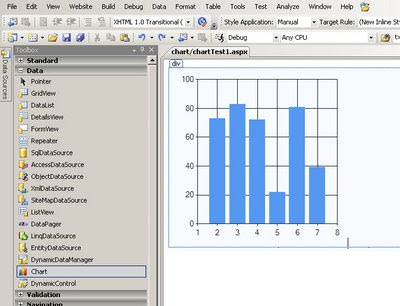
Now create a new web page and drag and drop chart control on page.


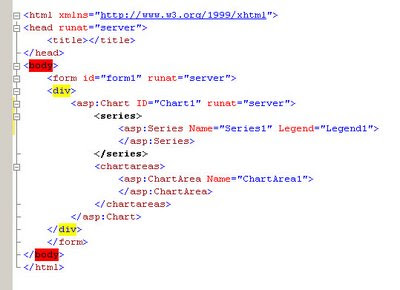
See the chart control's HTML:


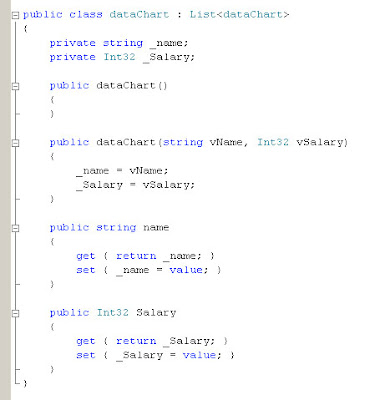
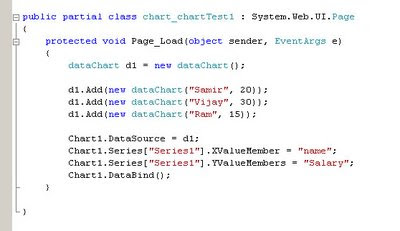
Now you can bind directly form database but here lets create a class for with to fields Name and Salary.


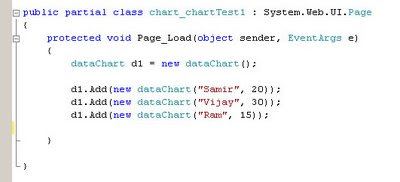
So we have two fields here Name and Salary, lets enter some records in page load event.


Three records are entered. Now lets bind chart control.


"Series" property is use to create X and Y axis data.


  1. protected void Page_Load(object sender, EventArgs e)
  2. {
    1. dataChart d1 = new dataChart();

    2. d1.Add(new dataChart("Samir", 20));
    3. d1.Add(new dataChart("Vijay", 30));
    4. d1.Add(new dataChart("Ram", 15));

    5. Chart1.DataSource = d1;
    6. Chart1.Series["Series1"].XValueMember = "name";
    7. Chart1.Series["Series1"].YValueMembers = "Salary";
    8. Chart1.DataBind();
  3. }


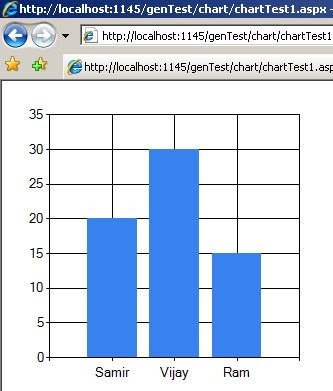
lets see the result :


This is column chart as default chart type, now lets change ChartType="Pie" and see the results:


There are many chart types are available and we can also create 3d chart. you can also save chart result as image using "SaveImage()" method. and also many other features. You can also bind with database using DataTable and also can write down static columns (Series) using HTML.

This is very useful control whenever we required to create chart.

Happy codding.

03 July 2009

Many time in commercial web sites client want to export data as excel sheet result correct with date time formatting and number decimal point formatting.

here is that kind of example.

string styles = "style> .amount { mso-number-format:0.00; } .exDate { mso-number-format: dd\\/mmm\\/yyyy; } /style> ";
//please write lessthan sign before "style" word


Table xl = new Table();
xl.BorderWidth = 1;
System.Web.UI.HtmlControls.HtmlForm form = new System.Web.UI.HtmlControls.HtmlForm();

string attachment = "attachment; filename=saActionTest.xls";

Response.ClearContent();
Response.AddHeader("content-disposition", attachment);
Response.ContentType = "application/ms-excel";

System.IO.StringWriter stw = new System.IO.StringWriter();
System.Web.UI.HtmlTextWriter htextw = new System.Web.UI.HtmlTextWriter(stw);

TableRow trTitle = new TableRow();
TableCell tcTitle = new TableCell();
tcTitle.Text = "saAction Test";
trTitle.Cells.Add(tcTitle);

TableCell tcDate = new TableCell();
tcDate.CssClass = "exDate";
tcDate.Text = DateTime.Now.ToShortDateString();
trTitle.Cells.Add(tcDate);

double m1 = 150.50;
TableRow trTitle2 = new TableRow();
TableCell tcTitle2 = new TableCell();
tcTitle2.CssClass = "amount";
tcTitle2.Text = m1.ToString();
trTitle2.Cells.Add(tcTitle2);

xl.Rows.Add(trTitle);

xl.RenderControl(htextw);
xl.Dispose();

Response.Write(stw.ToString());
Response.End();


And the excel sheet result is :


You can see that there is also date, Now Some time many developer faces date problem MM/dd/yyy or dd/MM/yyyy etc. it depends on system's setting as default though you want to add your own date format you have to apply style "mso-number-format" in your code.

There are many other style you can apply to get correct date and number decimal points amount.

mso-number-format:"0" No Decimals
mso-number-format:"0\.00" 2 Decimals
mso-number-format:"mm\/dd\/yy" Date format
mso-number-format:"m\/d\/yy\ h\:mm\ AM\/PM" D -T AMPM
mso-number-format:"Short Date" 03/07/2009
mso-number-format:"Medium Date" 05-jan-2008
mso-number-format:"Short Time" 8:67
mso-number-format:"Medium Time" 8:67 am
mso-number-format:"Long Time" 8:67:25:00
mso-number-format:"Percent" Percent - two decimals
mso-number-format:"0\.E+00" Scientific Notation
mso-number-format:"\@" Text
mso-number-format:"\#\ ???\/???" Fractions - up to 3 digits (312/943)
mso-number-format:"\0022£\0022\#\,\#\#0\.00" £12.76
mso-number-format:"\#\,\#\#0\.00_ \;\[Red\]\-\#\,\#\#0\.00\ " 2 decimals, negative numbers in red and signed
(1.86 -1.66)
mso-number-format:"\\#\\,\\#\\#0\\.00_\\)\\;\\[Black\\]\\\\(\\#\\,\\#\\#0\\.00\\\\)" Accounting Format –5,(5)

30 June 2009

Web designers have limitation to use font in web site, because fonts are comes form user computer not from web site.

But Adobe Flash have a feature to embed font in flash animation.

sIFR is meant to replace short passages of plain browser text with text rendered in your typeface of choice, regardless of whether or not your users have that font installed on their systems. It accomplishes this by using a combination of javascript,

Read more about sIFR.

See the example.

26 June 2009

Which java script framework you are using? If you are confuse that which framework use in web development jQuery or MootTools; I suggest you to go through this article.

This web site have very useful information about jQuery and MootTools.

Visit http://jqueryvsmootools.com/

Well I like jQuery. ;)
It is very good to compress javascript before you upload it before live site.

here it is a online tool to Compress and obfuscate Javascript code online completely free using this compressor.

Just enter your code and click on "Compress".


make it easy!

17 June 2009

I you are working on live site and you need to make some modifications on live server, during this modification you want to show a user friendly message that "Site is under maintenance" or "Site is under construction." or something like that, without affecting any page or database.

You just need to make a simple HTML page with "app_offline.htm" name and upload it on root directory of the web site. once user try to open this site, IIS will open this page in place of "default.aspx".

and you can write down, user friendly message on this page. after completing your task just delete this file or rename it. and site will start work as it is.


16 June 2009

WMD is a simple, lightweight HTML editor for blog comments, forum posts, and basic content management. You can add WMD to any textarea with one line of code. Add live preview with one line more.

See Demo here.

If any user don't want any advance functionality and just want to provide lightweight HTML editor, WMD is a very useful tool.

Some other popular editor are :

30 August 2008

DayPilot is an AJAX calendar/scheduling control for ASP.NET 2.0 that allows you to to build calendar-related applications: personal or shared event calendars, resource booking applications, time tracking applications, project management applications.


This one is g8!
If you want to apply theme to Ajax Controls Toolkit, You may get following error.


Parser Error


Description: An error occurred during the parsing of a resource required to service this request. Please review the following specific parse error details and modify your source file appropriately.

Parser Error Message: Unknown server tag 'ajaxToolkit:ControlName'.


This is because it is required to register all custom user controls in to the web.config file.

So, under "pages" element create "controls" and add folofing tag in to it.

add namespace="AjaxControlToolkit" assembly="AjaxControlToolkit" tagPrefix="ajaxToolkit"/>

Done, refresh the page. error is solved.

09 August 2008

You can create your own site's Search Menu in quick search panel of Internet Explorer or in Firefox.

Actually there will be a XML file named "OpenSearch.xml". See Here


Lets See...

I have a page and "OpenSearch.xml" file in my solution explorer.


And add "LINK" tag in head tag of "aspx" page.

head runat="server"
title saAction title
link rel="search" type="application/opensearchdescription+xml" href="OpenSearch.xml" title="saAction"
/head

Now run the page...

See the result in Internet Explorer...


See the result in Firefox...


But this is not enough, there is some other requirement see here.

08 August 2008


//use this name space.

using System.Net.Mail;


//User this code

MailMessage mail = new MailMessage();

//this is the main line to show friendly name in receiver's inbox.
mail.From = new MailAddress("saaction@myserver.com", "saAction Test Mail");

mail.To.Add("receiveremail@soomeserver");

mail.Subject = "Some Subject";

mail.Body = "see the friendly name in place of email address!";

SmtpClient objSMTP = new SmtpClient("Server IP");

objSMTP.Send(mail);


Lets' see the result.

02 August 2008

Before few days a go, It was a requirement to create a menu dynamically and apply link in to it.

Here it is a simple example to create hyperlink to the div tag.


Here in the above image you can see that, there are two menu with div tag, If I'm using HyperLink tag it will just create hyperlink to the text only. But if I want to create HyperLink to the entire block, I will not happens with simple "A" anchor tag.

So here is that trick.


See the above image, there is a style with cursor:pointer; style. It will started to show hyperlink mouse pointer to that image tag.

Now lets add hyper link to the div tag using some javascript.


You can see that using "onClick" event of that div tag have some javascript.

onclick="document.location='./TestPage1.aspx';"

It means when user will click on that div tag it will redirect the page to the "TextPage.aspx"