 Monday, July 06, 2009
 saAction
Many mobile user uses Flash animated wallpaper or screen sever, and they really like some kind of motion on mobile phone screen. And if you know flash and want to create some existing job with it. This quick tutorial will be help full to you.
lets create flash file which can run in your mobile?
This is very easy, lets create a flash file to apply it as wallpaper or screen sever.
I am using Flash cs2 to create this application.
Open Flash and select "Flash File (Mobile)" option.
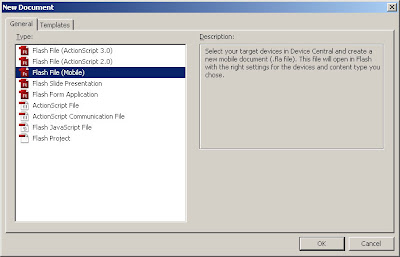
You will get new dialog box for mobile application.
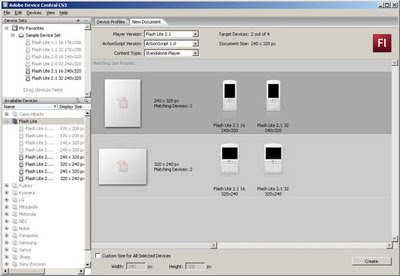
Select appropriate mobile phone device as per your requirement, I have Nokia 6300 and there for I am select using Flash Lite 2.0 16 240 X 320 from Device Set list.
click on "Create" button after selection, you will get blank flash with mobile screen layout.
Now put some images and text etc as you want:
and also create two text box to show bettye level and signal.
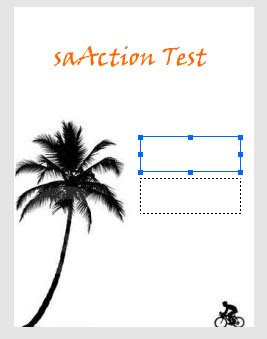
Chagnge those two textboxes property as dynamic and server variable.
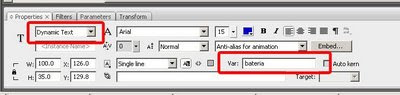
Textbox 1 : variable name "nBattery"
Textbox 2 : variable name "nSignal"
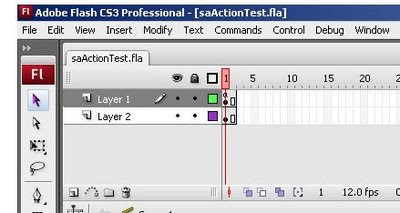
Now create two frame, this is because frame will play it self and every time we can get new amount for battery and signal :
Now add below action script
Add this script in first frame.
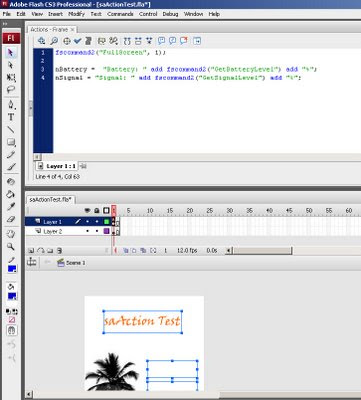
Here it is that code.
that's all.
see the preview in emulator by pressing "Ctrl + Enter"
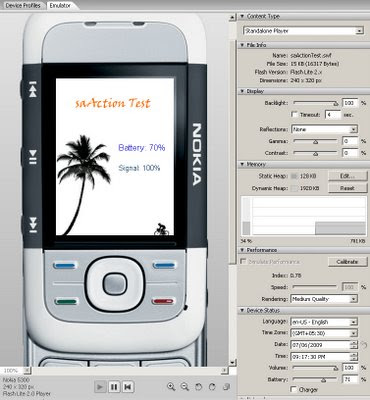
it will compile the code and will create a SWF file.
Now transfer that "swf" file in your mobile phone. and you can user it as wallpaper or screen sever.
Remember that your mobile phone need Flash support.
Create your own name's wallpaper, screen sever and apply it in mobile phone, and send to your friends.
have some fun.
lets create flash file which can run in your mobile?
This is very easy, lets create a flash file to apply it as wallpaper or screen sever.
I am using Flash cs2 to create this application.
Open Flash and select "Flash File (Mobile)" option.
You will get new dialog box for mobile application.
Select appropriate mobile phone device as per your requirement, I have Nokia 6300 and there for I am select using Flash Lite 2.0 16 240 X 320 from Device Set list.
click on "Create" button after selection, you will get blank flash with mobile screen layout.
Now put some images and text etc as you want:
and also create two text box to show bettye level and signal.
Chagnge those two textboxes property as dynamic and server variable.
Textbox 1 : variable name "nBattery"
Textbox 2 : variable name "nSignal"
Now create two frame, this is because frame will play it self and every time we can get new amount for battery and signal :
Now add below action script
Add this script in first frame.
Here it is that code.
- fscommand2("FullScreen", 1);
- nBattery = "Battery: " add fscommand2("GetBatteryLevel") add "%";
- nSignal = "Signal: " add fscommand2("GetSignalLevel") add "%";
that's all.
see the preview in emulator by pressing "Ctrl + Enter"
it will compile the code and will create a SWF file.
Now transfer that "swf" file in your mobile phone. and you can user it as wallpaper or screen sever.
Remember that your mobile phone need Flash support.
Create your own name's wallpaper, screen sever and apply it in mobile phone, and send to your friends.
have some fun.


